Each game in your collection is represented as a game card.
A game card gives you a quick overview of the most important details for that lottery game and provides direct access to useful actions.
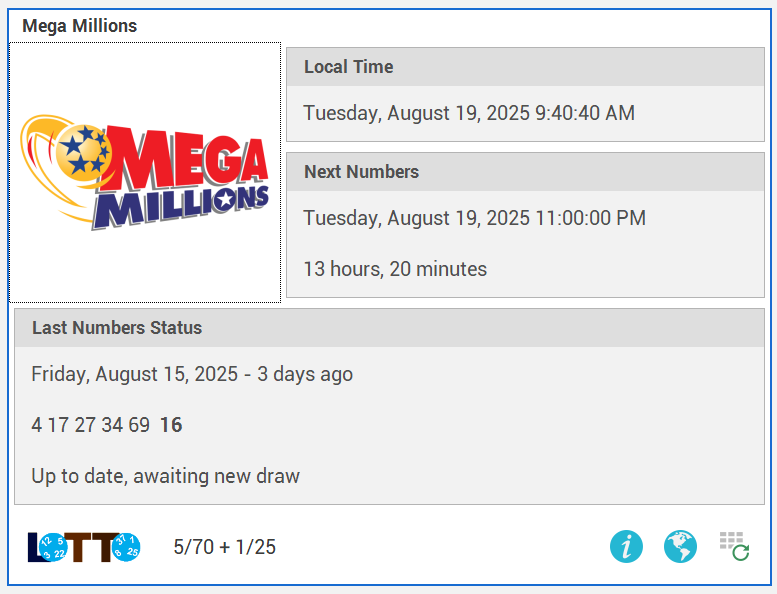
On every game card, you can see the following information:
Game Icon
Displays the game icon, you can change the icon using Game Properties feature.
💡 Tip: You can also open any game directly by double-clicking the logo on the game card.
Local Time
Displays the current local time in the country or state where the game’s draw takes place.
Next Numbers
Shows the upcoming draw date, based on the game’s official time zone.
Last Numbers Status
Displays information about most recently drawn lottery numbers for this game existing in your numbers database:
1.Indicates the date and time when the previous draw took place.
2.Displays the numbers
3.Shows whether the numbers are current (up to date) or outdated.
At the bottom of the game card, you will find:
Basic Game Info (left side) – The game type icon and key details of the selected game numbers.
Three Quick-Access Icons (right side):
Info Icon
Click to view the game description as set in Game Properties.
Earth Icon
Opens the official lottery web page for the selected game.
If the game’s website address has changed since the latest software release, you can update the link directly in Game Properties.
Update Icon
Instantly updates the game’s draw results and load numbers from our server.
See also My Games Window, My Games Toolbar Commands, and My Games Options
This type of view is also used with World Games and Lottery Numbers Manager features